software > imgProcessor - Resize your JPEG/JPG images taken from your camera in batch mode
What it does
imgProcessor is a handy little application to resize all .jpg in a folder to a specific size and jpeg quality. Original images are preserved and new ones are produced with suffix _resXXX.jpg where XXX is the new width in pixels.
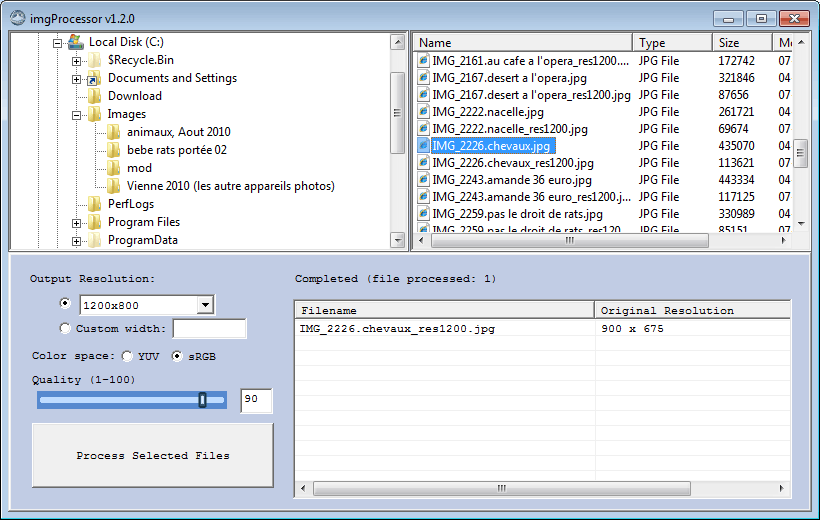
(i) Select the folder you want
(ii) Enter the width (Output Resolution) of the new image (the aspect ratio will be preserved)
(iii) Choose the JPEG color space (this will affect the size of file and its portability)
(iv) Choose the JPEG quality (this will affect the size of file)
(v) Click "Process"
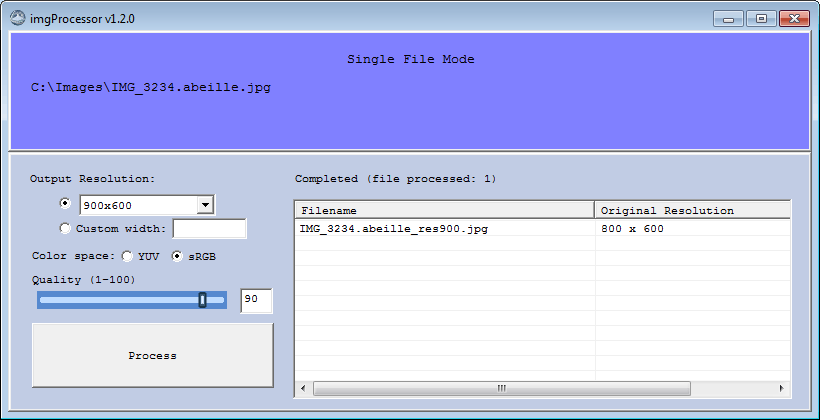
In single file mode.
Right-click a .jpg file in explorer and choose "[ Open with imgProcessor ]"
Download
Version 1.2.3 imgProcessor-v1.2.3.exe (28.Dec.2015)
Features
- Specify output JPEG resolution.
- Specify JPEG color-space {YUV422, sRGB}.
- Specify JPEG quality [0, 100].
- Processes all .jpg in a selected folder or only selected files.
- Right-click shortcut on a .jpg file : [ Open with imgProcessor ]
- It remembers the last folder you processed when you launch the program again.
- It remembers the last JPEG quality & color space that you used.
- Highest quality resizing algorithm, gives crispier images.
Quality comparison

Left bars: Original test pattern at 1600 pixels of width.
Center bars: Resized with imgProcessor at 600 pixels of width.
Right bars: Resized with Fotosizer at 600 pixels of width.
Version History
------------------------------
 v1.2.3 (Windows GUI version)
------------------------------
Release Date: 28.Dec.2015

Fixes:
- User folder is now set correctly on Windows 7 and preferences are saved correctly (last used parameters).
- Windows 7 was not rendering quality slider on some system on first load (needed to resize to redraw correctly).


------------------------------
 v1.2.0 (Windows GUI version)
------------------------------
Release Date: 05.Dec.2010

New Features:
- Specify JPEG color-space: YUV422 or sRGB (which is just standard 24-bit RGB).
- Processes selected .jpg in the file view.
- Supports Windows 7.
- Supports bigger Windows DPI settings (above 96 dpi).
- Added an installer (NSIS).
- Added right-click shell menu: [ Open with imgProcessor ] on .jpg files.
- It remembers the last color-space and last resolution used.

Known issues:
- Displaying files in folder can be slow.
- In the application interface, when you double-click a file, you don't get the same action as in the windows explorer settings.


----------------------------
 v1.1 (Windows GUI version)
----------------------------
Release Date: 25.Jul.2010

New Features:
- Windows GUI.
- Specify output JPEG resolution.
- Specify JPEG quality.
- Processes all .jpg in a selected folder.
- Process a single file when "Open With" is used on a .jpg with imgProcessor.exe
- It remembers the last folder you processed when you launch the program again.
- It remembers the last JPEG quality that you used.

Known issues:
- Displaying files in folder can be slow.
- You cannot process a subset of files in the top-right folder-content view, it's either the full folder or one file (when used with right-click -> Open With...)
- In the application interface, when you double-click a file, you don't get the same action as in the windows explorer settings.


----------------------------
 v1.0 (linux command-line)
----------------------------
Release Date: 15.Oct.2008

Features:
- Multiple image resolutions generation : 100x75, 120x90, 200x150, 684x512, 800x600, 1280x960.
- Recording: shutter speed, picture taken date, focal length, camera name, aperture, ISO speed, dimensions.
- Displaying (in web): shutter speed, picture taken date, focal length, camera name.
- Saving JPEG in YUV422 color space.
- A picture can be assigned to a category.
- A description can be assigned to a picture.
- xmlhttp is used to transfer categories and pictures. The main "galleries" section is loaded normally.
- Browser forward and back buttons, as well as picture direct access from URL is possible using the window.location.hash "anchor" trick.
- Admin interface.

Known issues:
- The current color space for JPEG (YCbCr422) is not optimally rendered by Windows XP Picture Viewer (and IE).
- Picture taken date is a couple of hours earlier than reality.


------------------------------------------------
----------------- Next Version -----------------
v1.3 (15.Mar.2011)
- Display a list of last processed folder to choose from.
- Fix Windows7 right-click shell action (only works in Windows XP)
------------------------------------------------
Contact author